Showing posts with label photoshop. Show all posts

Friday, October 28, 2011

A BFA (or Bad First Attempt)


The Web being what it is, sometimes it's impossible to find what you're looking for and sometimes you stumble upon it like some kind of...well, great old stumbling thing.

Today I found this website, which has lots of little helpful hints for using Photoshop and other CS5 applications, and thought I'd try my hand at retro-ing a photo.

I already have a bit of software for giving photos a Polaroid effect, but doing it via Photoshop is a whole different kettle of fish madness. However, as I'm currently doing my best to avoid a certain (paid) work-related task, I thought I'd give it a shot. Past experience has taught me that Photoshop can buy me hours of procrastination time.

This tutorial assumes I know more than I do (a little awkward really but I thought I'd try and fake it). It took me about an hour, and I fudged a couple of the steps. Really, it's a BFA if ever I saw one. The result is not so much retro-pic as cheesy B-Grade movie poster-pic. I'm half expecting Bo Derek to walk into the shot with hair braids and a white bikini. Still, now that I've got my first attempt out of the way, I can move onto what will hopefully be a SBSA (Slightly-Better Second Attempt). 

That should eat up another hour at least. Procrastination-City...here I come.
x
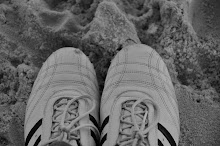
PS pre-Photoshop pic below...


For anyone interested in the location, it's beautiful Geordie Bay, Rottnest Island.

Monday, August 22, 2011

Not happy Jan....


I know, I know....such a grumpy title to go with these peaceful-looking images. The fact is, I am back at work. Long-service leave over with a capital Oh-Dear-God-I-Just-Want-To-Sleep-In. As nice as it is to see all the lovely people I work with, staying home and playing around with Photoshop (whilst wearing my slippers) was infinitely better. I spent lots of time designing stuff to hang on my walls. Artwork I guess it's called. Strangely, designing was easier than working out how to get it printed to any kind of standard. Still, quicker than you can say "I'll have another IKEA frame thank you very much", I have some custom-made designs framed and hung. I even have one hanging at my sister's place.

All of which relates not-at-all to these shots taken with my Nikon way-back-when my teenager was still little-ish. Having had no time at all to take pics (a fulltime job 'll do that) I was scrolling back with a hefty dose of nostalgia (and not a little grumpiness - hence the title), and came upon these. They were taken with my 50mm lens (the one I have trouble focusing), with my camera set to manual mode. I bravely waded into manual as I wanted a shallow depth of field with a fast-ish shutter speed. A good portion of them were terrible, but some were not-too-bad. And, addicted to Photoshop as I now am, I have made a little collage for y'all. 

So, tomorrow it's back to the real job - the one that pays the bills. But tonight, I'm happy to be back in my slippers one more time.
x

Friday, May 27, 2011

Framed


Don't you love it when you come across a helpful person? Well, the lovely chap at The Minute Man Press in Fremantle is one such person. Just to be clear, he is not a short statured man, but a very quick man, in case you are confused by the name of his business.

I had spoken to him on the phone earlier in the week to find out some details. I had noticed that my Photoshop files were about the size of a small country, and when I enquired about this he suggested I start by making them the size that I wanted them to be printed. "Good tip", I thought, but didn't want to ask how to do that for fear of seeming, well, you know...stupid. 

He mentioned that the resolution should be no higher than 300. "So 72 won't do?", I asked. His response was somewhere between pity and horror, so I took note to change the resolution. 

My last question was about colour. "It needs to be (insert something along the lines of DKNY here)". Thinking it couldn't be anything to do with an American fashion designer, I took note to find out what this abbreviation was and use it.

Oh dear. It looked like I needed to start again. So, back to Photoshop, and after a bit of looking around at the settings available to set up my 'canvas' for a new file I saw I could choose the size in cm, set the resolution to 300 and choose CMYK colour. Easy.
A little while later I had this print saved in JPG and PDF, and had added the word "Flying" to the picture. It just seemed to need it.

The Minute Man had told me to bring the pictures in on a disk, so that is what I did. He was very helpful in assisting with paper weight and other details such as gloss vs no gloss. (Who knew these were questions?) He even commented on how well they had turned out, and told me that I "obviously knew what I was doing". Ha! If only he knew.

I had another couple of designs printed up too, which I will share with you another time. In the meantime, Mr Minute and I are very happy with how this one turned out.


x

Tuesday, May 24, 2011

More Photoshop madness


I can't seem to walk past my computer at the moment without sitting down to do battle with Photoshop. It's me against the software!
Photoshop may be winning the war, but I think I have won the latest battle....teaching myself how to create silhouettes.
The image above started out like this... (one of my favourite photos by the way, taken a few years ago)


Using the "quick selection tool" (which, confusingly, looks like a paint brush) I selected the part of the photo with the figure jumping.
Next, I clicked "edit", and then "fill", and filled the selected part of the photo with white. 
I then clicked "select" and "inverse" which then highlighted the remainder of the photo, and again, filled it, this time with yellow.
Next I used the quick selection tool to highlight the white image and copy and paste it. To move them around I had to click on each "layer" (this is the part that I really don't understand about Photoshop - what are these layers you speak of?) and click the moving tool to move the images around.
And, sadly, these few simple steps took hours! Oh dear. But I'm happy with the result, and may play around with it to make it suitable for uploading to Spoonflower (to make some fabric). It may also make a cool artwork to put in a frame.

Once I'd got the hang of it I played around with some more images. 
This photo of the very clever Minky G and the Effects....


became this....

...kinda like it!

At some point it occurred to me that there must be a "Photoshop for Dummies" book out there somewhere. If I'm ever going to win this war, I'd better get my hands on a copy.
x

Monday, May 23, 2011

Some fabric lovin'


I have stumbled upon a great website which allows you to print up your own fabric designs. Hallelujah. For some inexplicable reason this is providing me with unending joy!

Whenever I find a new site, I naturally assume I am the last person to find it. I am picturing you now saying "What, Spoonflower? Everyone is using Spoonflower!"

Well, just in case you don't know about Spoonflower, this is how it works:
1. Design your fabric using whatever means you choose.
2. Upload it as a JPG or TIF (there are other formats but I have no idea what they are...)
3.Choose how you want your pattern to repeat on the fabric, and your type and size of fabric.
4. Pay 

That is as far as I have progressed. I have paid, and being the el-cheapo that I am, have opted for the snail's pace delivery. I'm expecting to see it sometime next year (not really, but it won't even be shipped for 12 days so I'm guessing it will be a while). No problemo...gives me lots of time to plan what I am going to make from my own personalised fabric.

Now I'm a bit of a sucker for words printed on fabric, so I have uploaded two designs. The design above   will repeat in a "half-brick". It covers an area 8 inches square (well, hopefully if I've done it right!). I have ordered a "yard", which sounds more like somewhere the kids play than a measurement but who am I to argue. I am planning on using some of this for an apron (I'm thinking a small amount of it with some black canvas-type fabric should be suitably kitchen-y).

I have also ordered the design below...

...for a cushion or two. 

Stay tuned and I'll let you know when it arrives.

x

PS I designed these using photoshop. Something tells me this is going to become a slightly addictive hobby!


Monday, January 10, 2011

A little bit of magic...


...Photoshop magic that is. I am such a Photoshop novice. About six months ago I downloaded a trial and played around with it for a month. It has taken me until now to buy it, and I am in equal parts rapture and despair. Adobe, do you have to make it so difficult to use? After struggling on for what seemed like days (ok - I'm over-dramatising... a few hours) I have taught myself how to use a couple of Photoshop tools - badly use them, but use them nonetheless.
Check out the photo above. I have cropped it and added a border to make it look a little bit polaroid-esque. I have removed the back of Alex's head (sorry Alex, nothing personal), the corner of the boat and the dinghy rope using some rather poor colouring-in. I then added a filter to give it a dated look, and hey presto, new photo. Lots of fun!
x
P.S. Below is the original.


Monday, May 31, 2010

Messing around with boats

Well, boatsheds actually. We took a drive out of Fremantle towards the city, along the river. That makes it sound much more romantic than it really was, but hey! Along the way we passed the Crawley Boatshed. Real pics later, but for now, the groovy Photoshop version.
x`

Sunday, May 23, 2010

Tearing my hair out...thanks to Photoshop

How hard is it to learn something new? This photo collage of recent trip to York involved hours of work and a great deal of swearing. Now that it's done though, I'm a little bit chuffed with myself!
Happy Sunday.
x

Related Posts with Thumbnails